Why companies switch to this
You get a working ERP on day one, and you keep the right to change it. That is the combination boxed products and most cloud suites refuse to sell together.
A boxed ERP you cannot change. A generic cloud app you cannot extend. A custom build that ships in two years. ZuloOne is the accounting platform that already runs, and still lets you add the object only your business has — without a fork, and without waiting for a vendor screen.
You describe it. It exists.
A dictionary or a document is metadata. Seconds later there is a table, an API, a list and a card. Nobody opens a ticket for a screen. Nobody waits a release cycle for a column.
One office. Every contour.
Sales, warehouse, tax, payroll and the ledger share one login, one ribbon, one tenant. A posted invoice writes stock and the book in the same second. The field app talks to the same APIs — it is not a second product.
Real books, not a status field.
Registers keep balances and dated rates. The next document and the report read the same memory. There is no second database «for analytics», and no spreadsheet that is the real system of record.
Your process is a first-class object.
A field, a document, a command or a country pack that only you need lives in your layer. The next platform upgrade does not take it away. You are not merging a fork, and you are not stuck on last year's version.
You write
- Metadata — objects, fields, registers, menus
- Business logic — postings, validation, commands, services
- Forms and reports, in the designer or as metadata
You never write
- SQL migrations
- Entity classes
- Controllers and endpoints
- UI components
The result: a new process is a new object on the same platform — not a second product, not a year of screens, and not a fork you will have to merge.
Metadata objects
A business application in ZuloOne is metadata plus scripts. From that the platform generates tables, entity classes, REST API and the whole interface.
Below are the kinds of object you describe. The twelve modules are combinations of these objects, not separate programs. When a module does not cover you, you add the same kind of object they are made of — and it gets a list, a card, an API and a place on the ribbon.
- Dictionary
A catalogue of one kind of master record: items, counterparties, stores, tax codes. Hierarchical (item groups) or flat. A list and a card. Reference fields on other objects point here — that is how records are wired together. The platform numbers the ID, keeps translations on the caption, and generates the grid and the form from the field list.
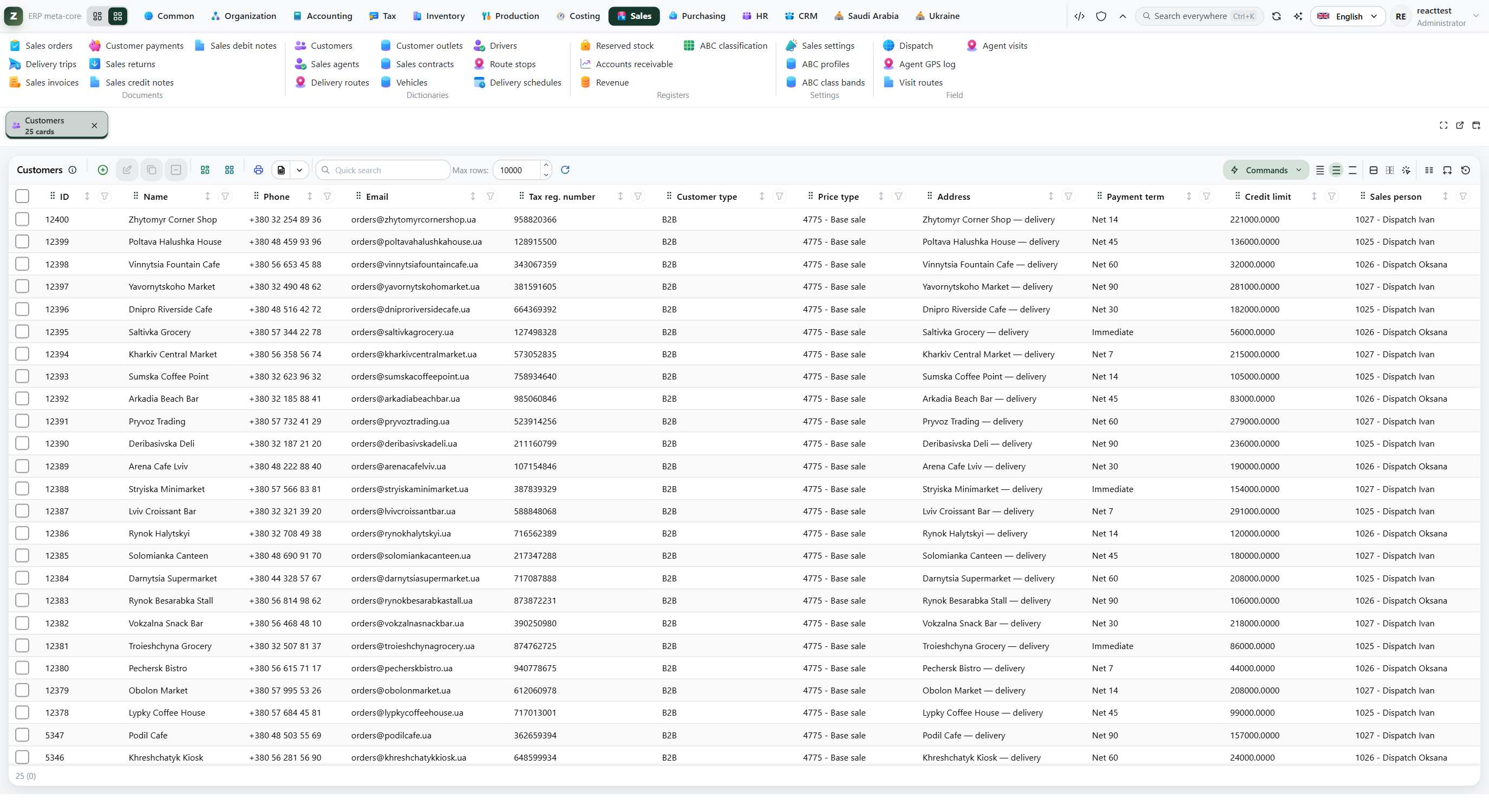
A dictionary list. Search, filters and sortable columns are the same pattern on every catalogue — they are not written per object. - Document
An operation that will change the books: an order, a receipt, a shipment, a payroll run. Header plus table parts. It lives in a subtype — draft, confirmed, posted, paid. The subtype is the state machine; scripts on the target subtype write the registers.
Save writes the record. It does not move stock, receivables or the ledger. After Save the subtype dropdown on the card is frozen. Only a command — a button that can check stock, lines and the open period — sets the next subtype. If the state were a dropdown, every one of those checks would be one click from being skipped.
The target subtype runs its postings: movements across registers. One invoice can take goods off the shelf, recognise revenue, create a receivable, and land all of it in the general ledger. One subtype can carry several posting scripts, one per accounting concern — stock, cost, tax, GL — not one script that does everything.
Reversing is a command on the posted subtype. Movements are removed; there is no good way to edit them by hand.
Postings take the document's date, not the moment the button was pressed. A back-dated document lands in the period its date belongs to.
What What it is Where Posting boundary One cut-off date for the whole tenant: nothing posts or reverses before it. Not a calendar of accounting months. Administrator Fiscal periods The calendar of accounting periods, each with its own state. The ledger picks a period from the document date; a closed month here is not the same as the posting boundary. Accounting 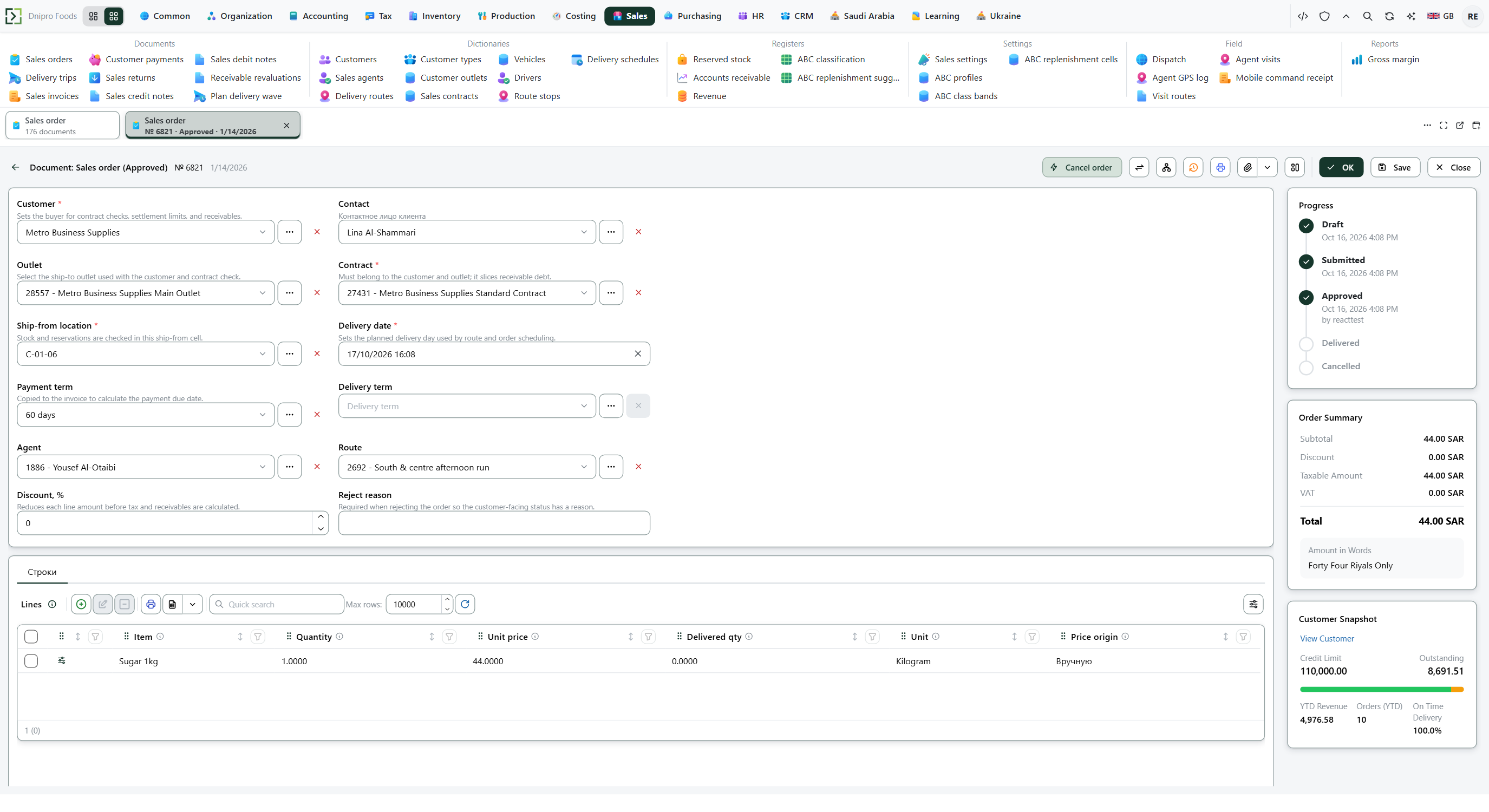
Every field on this card comes from the document's metadata. The form is the workplace for that object, not a hand-built screen. - Form
The screen of a dictionary or a document, generated from the object's fields. Layouts can still be rearranged: drag fields, group them into cards and tabs, change labels and widths. A layout is personal, shared (developer rights) or the automatic default. A shared layout travels with the model. Shortcuts: Enter walks fields, Ctrl+S saves, Ctrl+K searches objects and records.
- Command
A button on a form or a list: post, confirm, recalculate, reverse, convert. It can check conditions first and then change a subtype, call a service, or write a register. A document subtype with posting scripts and no command to reach it cannot be posted from the UI — that is deliberate.
- Menu
How objects appear on the ribbon. A model owns a tree: groups for dictionaries, documents, totals, reports, then the items. A model may graft its items into a group of a lower-layer model. Rights hide a tab; a missing tab is a missing permission, not a missing feature.
- EDT and number series
A field is typed by an EDT: string, number, date, boolean, or a reference to a dictionary. Enumerations are integers. A number series stamps a human-readable ID on a new record; the platform creates one if you do not declare it. These are metadata objects too — they are not columns you invent in SQL.
- Service
Logic that more than one script needs: pricing, picking, generating the next document, calling a tax engine. Scripts stay thin: check, call the service, return. Several models can wrap the same service contract through Chain of Command.
Registers: the memory of the company
A register is not a table you fill. It is the accounting memory: balances, movements, and dated facts. Documents write it; reports and other documents read it.
This is why you do not buy a warehouse system, a receivables system and a BI store on the side. Stock, money and tax live here. The next document sees what the last one posted.
- Accumulation register
- Dimensions (item, store, batch…) and resources (quantity, amount). A posting writes a movement; the engine keeps the balance. Stock, receivables, payables, cost layers, tax ledgers, turnover — these are accumulation registers. Double-entry pairs, FIFO engines and virtual totals sit on this object. Nobody types a row into it.
- Information register
- A value that was true at a point in time: a tax rate on a date, a class in an ABC journal, a setting that has a history. One row per combination of dimensions at a Period. A later Period closes the previous one. SliceLast / SliceFirst answer «what held on this date». It is not an interval from–to, and it is not a balance.
What this makes possible
A totals report is opening, receipts, issues, closing, sliced by the register's analytics — without a separate warehouse analytics store. A later document reads the same stock or the same rate the earlier one wrote. Recalculation and reversal are movements, not edits. The posting boundary applies here too: a Period behind the cut-off is refused.
The Totals workplace is this register with a list and a filter, not a separate product. A virtual total is a saved cut of the same register: group-by, a caption, a zero opening — still one engine.
Workplaces
The office is one generated workplace. Ribbon, lists, cards and the desktop come from the objects above, so every module looks like the same product — because it is.
Users learn one office. A document you added this morning already has a list and a card. You do not ship a second UI per contour, and you do not train people on a new product every time the business grows.
- Ribbon
- Area tabs with commands and page links. Typical areas: Workspace, Developer, Administrator. Which ones you see is rights, not a different application.
- Lists
- Every dictionary and every document type has a grid: search, filters, sortable columns, commands on the rows. Opening several lists as tabs is the normal way to work.
- Cards
- The record form. Header and table parts on their own tabs. Several cards can stay open at once. The assistant docks beside the card and narrows it; it does not cover the workplace.
- Layouts
- Each card has a layout button. Fields drag, group into cards and tabs, change labels and widths. Personal, shared, or reset to the automatic form. Shared layouts travel with the model between environments.
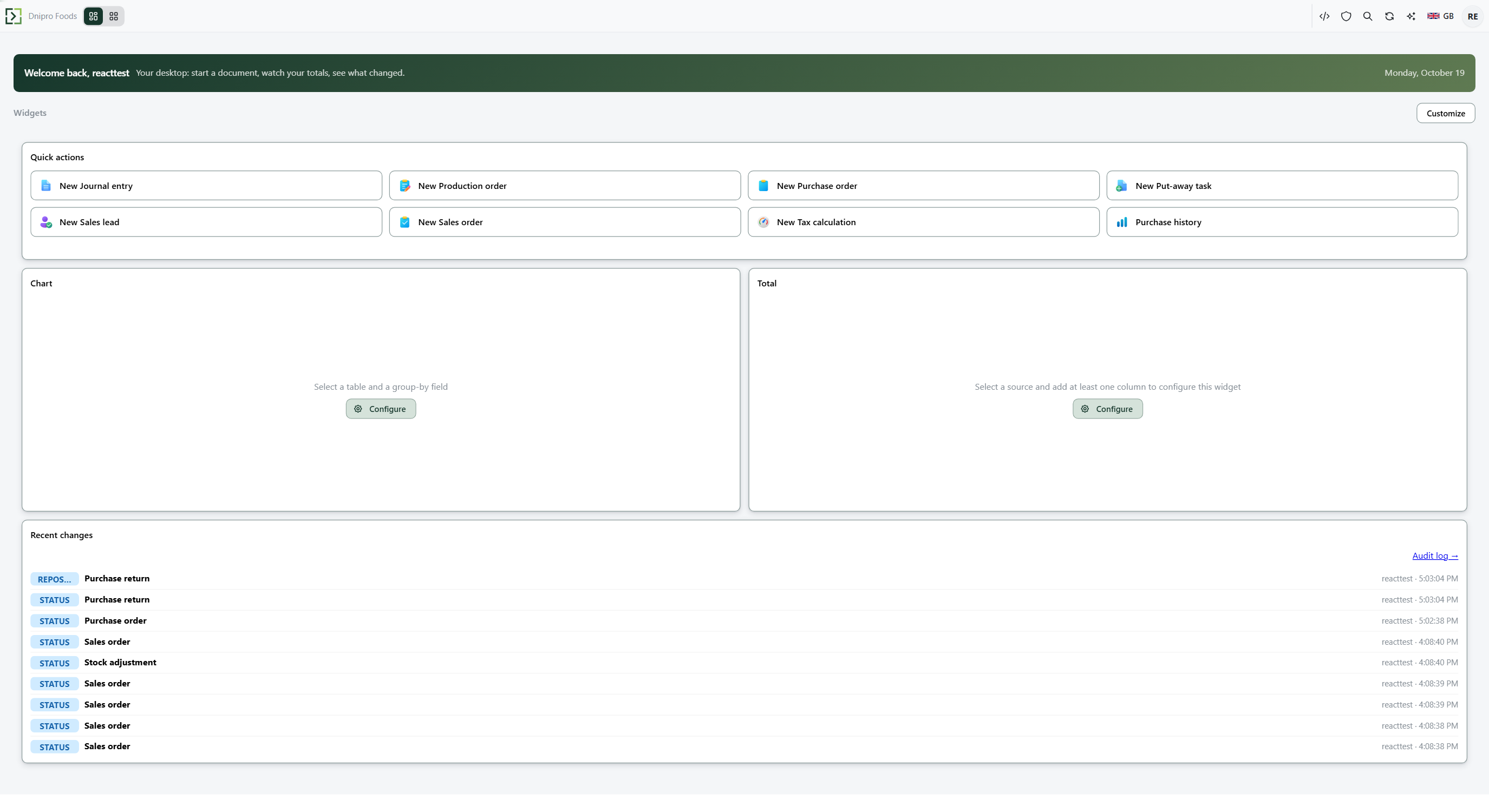
- Desktop widgets
- Tiles on the home workplace: counts, totals, a small list, a chart, a scripted tile. They read the same dictionaries, documents and registers. A manager's Field Desk is a widget, not a second product.
Layers and extensions
The application is a stack of models. Each model sits in a layer. A lower layer never sees a higher one. That is what keeps an upgrade of the shared core from overwriting a customer's work — and why you can stay current without freezing customisation.
System → Base → Solution → Customization → User
A model sees everything below it and may extend it. It never edits a foreign object in place. A new field on a lower-layer dictionary is declared in your model; the platform wraps it as an extension. A menu item can be grafted into someone else's group. Your customisation lives in an upper-layer model and travels with that model between environments.
How an extension runs
Several handlers can sit on one dictionary, document or service: the owner in the object's own model, then each layer above. That is Chain of Command — an onion, not a list of subscriptions. The top layer starts first, calls next() / nextAsync() downward, and work after next() sees what the warehouse and the ledger already wrote.
The owner does not call next. An extension of a foreign object must declare itself and must call next from every override — otherwise the chain is broken. Replacing a link swallows the rest of the chain on purpose. Several posting scripts on one subtype are a horizontal list (stock, then cost), not that onion.
A country is a layer, not a fork
Saudi VAT, ZATCA, Ukrainian VAT sit in their own models on top of Tax, Sales and the ledger. They add rates, reports and outbound channels. They do not copy the shared objects. Adding a country changes nothing for everybody else.
Twelve modules. The rest you add.
A module is dictionaries, documents and registers on the platform, plus the scripts that post them. Install it, extend it with your own model, or leave it out. It is not a separate program and not a separate database.
One posted document can write registers that belong to several modules. If the twelve do not cover a process, that process is still an object of the same kind — not a project in another system. Topic docs (ABC/XYZ, and the rest) walk a contour end to end.
| Module | Role in the business | Layer |
|---|---|---|
| Common | Shared building blocks: units of measure, money, geography, the base dictionaries everything else references | Base |
| Organization | Legal entities and org structure — companies, divisions, sites | Base |
| Accounting | Chart of accounts, fiscal periods, the journal and the general ledger | Base |
| Tax | Tax engine: codes, dated rates, determination rules, and the tax ledger | Base |
| Inventory | Items, stores, zones and cells, the stock register, warehouse movements | Solution |
| Purchasing | Purchase orders, goods receipt into stock, payables recognition | Solution |
| Sales | Orders and invoices, reservation, tax context, revenue recognition | Solution |
| Production | Bills of materials and production orders — raw material issue and output | Solution |
| HR | Positions, employees, payroll accrual and payment | Solution |
| CRM | Loyalty, leads and quotations on top of the customer order | Solution |
| Costing | Inventory valuation and cost of goods sold, FIFO or average, configurable | Solution |
Country localisations
A country is a separate model layered over the shared core. It adds statutory rates, reports and government integrations without editing anything underneath.
- LocalizationSaudiArabia
Saudi Arabia: 15% VAT, ZATCA/FATOORA e-invoicing with the required signing and clearance
- LocalizationUkraine
Ukraine: VAT on sales and the corresponding payable register
The principle
A business function is global. Country compliance is a localisation. The UI comes from metadata. Price is a contract and rules, with an explanation.
Sales, inventory, purchasing, the tax engine, the ledger and pricing live in shared layers. A new country is a new model on top of them, not a fork and not a switch statement — which is why adding one changes nothing for everybody else.
SaaS — a stand that is actually yours
ZuloOne is software-as-a-service. You do not buy a licence to install on Friday night. You subscribe to a stand: your subdomain, your container, your database, already running.
- What the subscription is
- Hosting, upgrades, backups and the people who answer when something breaks. One price per stand, not a stack of licences for the database, the app server and the monitoring. Plans and seats are on Pricing.
- Not a row in a shared database
- Each tenant is its own container and its own database, behind a shared proxy. A neighbour's load is not your outage. Your data is not mixed with anyone else's.
- Upgrades you can pin back
- An upgrade takes a snapshot first and can return to the previous image. A bad release is a minute of downtime, not a restore from backup and not a weekend with the vendor on site.
- Nothing is trapped in the instance
- Customisation — forms, rules, reports — is metadata and travels with the model between environments. Data and configuration can be exported at any time. Enterprise can also run on your own infrastructure, by agreement.
Start on our hosting. Keep the right to leave with the model and the data. That is the difference between a SaaS you rent and a platform you own.
See pricingSee it with your own hands
Twenty-four hours, a real tenant, sample company data already loaded. If this is the platform, the next step is a stand of your own — not another year of choosing between products.