🏬 Stores and stock (the process)
Updated
How the store process (WMS) is built in the model. Object metadata — 04-Inventory; the order for creating master data before the first document is there too: "Master-data creation order". The store contour — the process map (§5–7): put-away and picking exist, and the discipline is off by default; when enabled, confirming an order (creating the realization in Reserved) creates a draft PickTask.
The key principle: the balance is per cell#
The storage hierarchy (MIQS) is Store (store) → StoreZone (zone) → StoreCell (cell) with row/rack/shelf/cell address and type (StoreCellType).
The cell role (receiving / storage / picking) is the StoreCellType.Purpose field, a closed enum (StoreCellPurpose), not a comparison against the type NAME. StoreCell.IsPickable is hidden: code does not read it; picking role is only Purpose = Picking.
Stock balances are counted by store cell (StoreCell), not by the store as a whole. Store and zone are derived from the cell. The register allows a negative (allowNegativeBalance:true) — refusal over the balance sits in each document's event separately (not in a common service and not in the engine), and each check is its own. Details: 04-Inventory § Documents.
Mandatory paired movements#
Goods do not "teleport" — every movement is a pair (minus from one cell, plus to another). This is always true, regardless of the setting below.
The receiving → storage → picking discipline is switchable#
The full three-step cycle below applies only when InventorySettings.EnforceWarehouseTasks = true. Empty equals off. With the flag off, receipt and issue work in any cell, without put-away or picking tasks. The flag stays off by default so a stand that does not run a bin-addressed yard is not forced into those tasks.
Turning it on with live data is safe: PrepareAllYardsAsync sets Purpose on types whose name matches the role and completes every store's missing receiving / storage / picking cells. A new store created while the flag is already on receives the same yard by itself. Running it again creates nothing extra.
With the flag on, receipt is only into a Purpose=Receiving cell, issue only from a Purpose=Picking cell, and put-away and picking tasks are mandatory between them. Which way goods get from storage to the issue cell is decided by the next field.
Shipment scheme#
Field InventorySettings.FulfillmentScheme, caption Shipment scheme. Path: Inventory → Settings → Inventory settings. Where to click — instruction. It matters only when Enforce warehouse tasks is on. If the flag is off, the field affects nothing: confirming an order creates neither movements nor draft picks.
| Value | What happens when the order is approved |
|---|---|
Simple (Simple) |
If storage cells in the store have enough for the line, a StockTransfer is posted from each source cell to the order cell (the one the realization issues from), exactly for the needed quantity. Parent of every transfer is this order. Re-approving does not move stock a second time. If storage has less than the line, no transfer is created. |
Extended (Extended) |
A draft PickTask is created for each storage cell that gives quantity: a line covered by the first cell becomes one task; 10+5+7 for order 20 becomes three. If storage has less than the line, no draft is created. Stock does not move until the storekeeper presses Confirm pick. |
| Not set and empty field | Same as Extended. The empty enum value is zero, and zero does not move stock by itself. |
Changing the scheme does not replay an already approved order: the next value applies to the next approval. Already created transfers or tasks stay.
Example. The line is 20, storage has 10, 5 and 7. Simple scheme: three posted transfers put 20 into the issue cell, leaving 2 in storage. Extended: three drafts for 10, 5 and 5; stock stays in place until each pick is confirmed. A draft holds ReservedStock in its storage cell; confirmation moves both goods and reserve to the picking cell. Issue, transfer, write-off and put-away confirmation ask ICellFreeStock: physical balance minus somebody else's reserve. This pick draft's own reserve is not included, so confirmation does not refuse itself. Stock count compares the count with physical balance and does not include reserve.
Delivery ─▶ [RECEIVING cell] ─PutAwayTask─▶ [STORAGE cell] ─PickTask─▶ [PICKING cell] ─▶ consumption / sale
Store documents#
| Document | What it does | Transition | Command in the UI |
|---|---|---|---|
| PutAwayTask | receiving → storage | Draft → Confirmed (PutAwayStockTx) |
Confirm put-away (ConfirmPutAway); print — PutAwayTaskZr (put-away sheet, quantities, no amounts) |
| PickTask | storage → picking | Draft → Confirmed (PickStockTx) |
Confirm pick (ConfirmPick); print — PickTaskZr (pick sheet, quantities, no amounts) |
| StockAdjustment | write-off / write-on | Draft → Posted |
Post adjustment (PostStockAdjustment); print — StockAdjustmentZr |
| StockTransfer | free cell-to-cell movement | Draft → Posted |
Post transfer (PostStockTransfer); print — StockTransferZr |
| StockCount | stock count | Draft → Posted |
Post stock count (PostStockCount); print — StockCountZr |
| GoodsIssue | issue | Draft → Posted |
Post goods issue (PostGoodsIssue); print — GoodsIssueZr |
The lines of these four documents have a cell. An empty line uses the header cell. A filled line moves its own cell: one StockTransfer can take 4 from one cell and 3 from another into one target, and its lines can also have their own target (To cell); write-off and issue check the balance of this cell, not the header, where there may be more goods; stock count calculates the delta from the line cell balance.
Three documents (PutAwayTask, PickTask, StockTransfer) move Stock as a pair of cells; the other three (GoodsIssue, StockAdjustment, StockCount) write one signed movement. Availability is checked by each document's own event, not by a common service; otherwise it suggests creating a PickTask. Which of the two roads works is set by shipment scheme.
Several orders from one storage cell are collected by Gather pick wave (PlanPickWave, Inventory → Documents ribbon): draft PickTasks, each with the order as parent, are folded into one draft with the same cell, and lines are copied as they are; old tasks are deleted. A single draft, an already confirmed pick and a task without an order are not touched. Repeating removes nothing. Stock is still moved by Confirm pick. Tasks from different cells are not merged: approval already wrote its own quantity for each.
Only a SalesRealization in Issued (Released) writes stock off. By then the goods must already be in the picking cell. The transition from the card is made by a command, not a subtype selector — see commands and subtypes.
Two picking paths#
Picking exists twice and the two paths are not connected.
- Inventory picking is
PickTask: storage cell → picking cell. It is a store document. It writesStockbyPickTaskTxwhen Confirm pick moves the task to Confirmed. Use it when a storekeeper physically moves goods before issue. - Sales realization picking is the Picking / Packing / Shipped chain on
SalesRealization. It is a sales workflow. It keeps the realization reservation and ends with Release realization, where the sales scripts write stock, receivable, revenue, tax, and optional ledger entries. Use it when the sales realization is being prepared and released.
Confirming a PickTask does not press Start picking on a sales realization. Pressing
Start picking or Mark packed on a sales realization does not confirm a
PickTask. The common hand-off is the cell: by release, the goods must
be in the picking cell that the realization issues from.
A worked example#
- A delivery of 100 bolts arrives → PutAwayTask: from receiving cell
RCV-01into storageSTG-05. Confirm put-away (Draft → Confirmed) →Stock[STG-05]+100. - Production needs 30 → PickTask: from
STG-05into picking cellPCK-02. Confirm pick →Stock[STG-05]−30,Stock[PCK-02]+30. - Production writes off 30 strictly from the picking cell
PCK-02. If there was not enough there while storage had plenty, it would be refused with a suggestion to create aPickTask.
Units of measure: class, ratio, and item packaging#
Pairwise UnitConversion(A, B, Factor) rules are not in the product: they gave no transitivity, allowed meaningless pairs like "kilogram → metre" and set packaging globally (BOX→PCS = 12 for the whole catalogue). Quantity uses two independent layers:
- The kind of quantity and the ratio to the base unit —
UnitClass(Common) plusUnitOfMeasure.UnitClass/RatioToBase. Conversion within one kind isqty × (ratio_from / ratio_to), and transitivity is free. Conversion BETWEEN kinds (mass ↔ length) is impossible in principle — the service returnsnull, not a meaningless number. A unit converted to itself returns the quantity rather than "no rule", because otherwise the platform would reject every line in the item's own base unit. - Packaging belongs to EACH item —
ItemUnit(Inventory):(Item, Unit) → QtyInBaseUnit. One item's box is 12 pieces and another's is 6, so a packaging unit (BOX,PAL) deliberately has NO ratio inUnitOfMeasure— outside an item context it means nothing. The ratio must be positive, and packaging in the item's OWN base unit is rejected as meaningless.
Two services on the layers: UnitConverter (Common) converts quantity classes only; ItemQuantityConverter (Inventory) is what the engine calls on every line write with a quantity — packaging through ItemUnit first, otherwise the class. An item with no packaging configured is not converted at all (null), rather than quietly left in its source unit.
Stock report#
The totals tab on the Stock register opens the Stock by item and cell layout (StockByItemCell in Inventory). Groups: item, then cell. Columns: opening, incoming, outgoing and closing by Qty. A row with zero closing is hidden. Example: 10 came in, 4 went out — closing 6, row exists; 10 came in and 10 went out — closing 0, no row.
A custom layout is saved with the disk button on the same tab. The column caption in the layout file is empty: the screen substitutes the column-kind name in the interface language. A written caption remains as written.
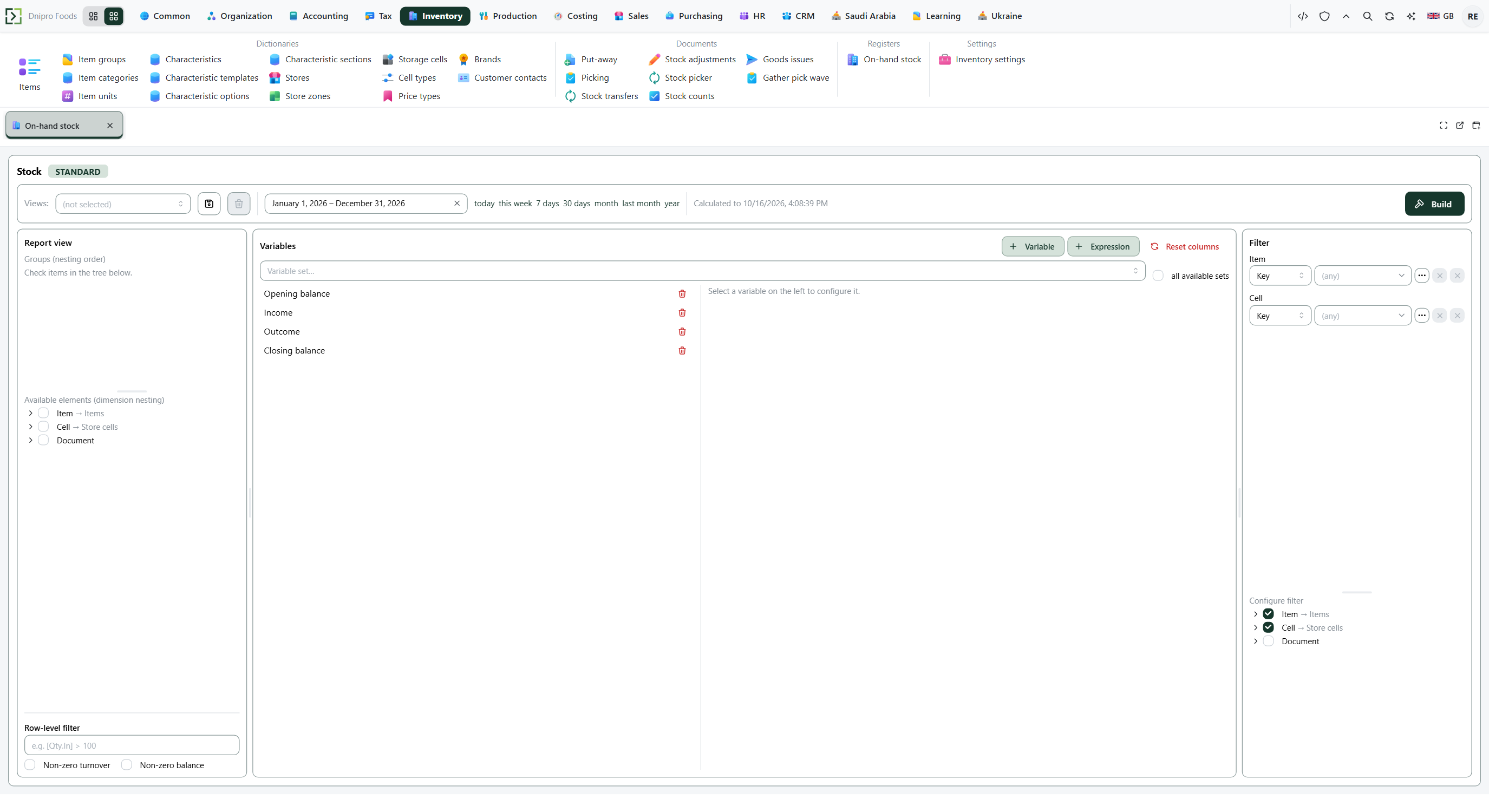 Stock register report builder: dimensions are available before the report is built.
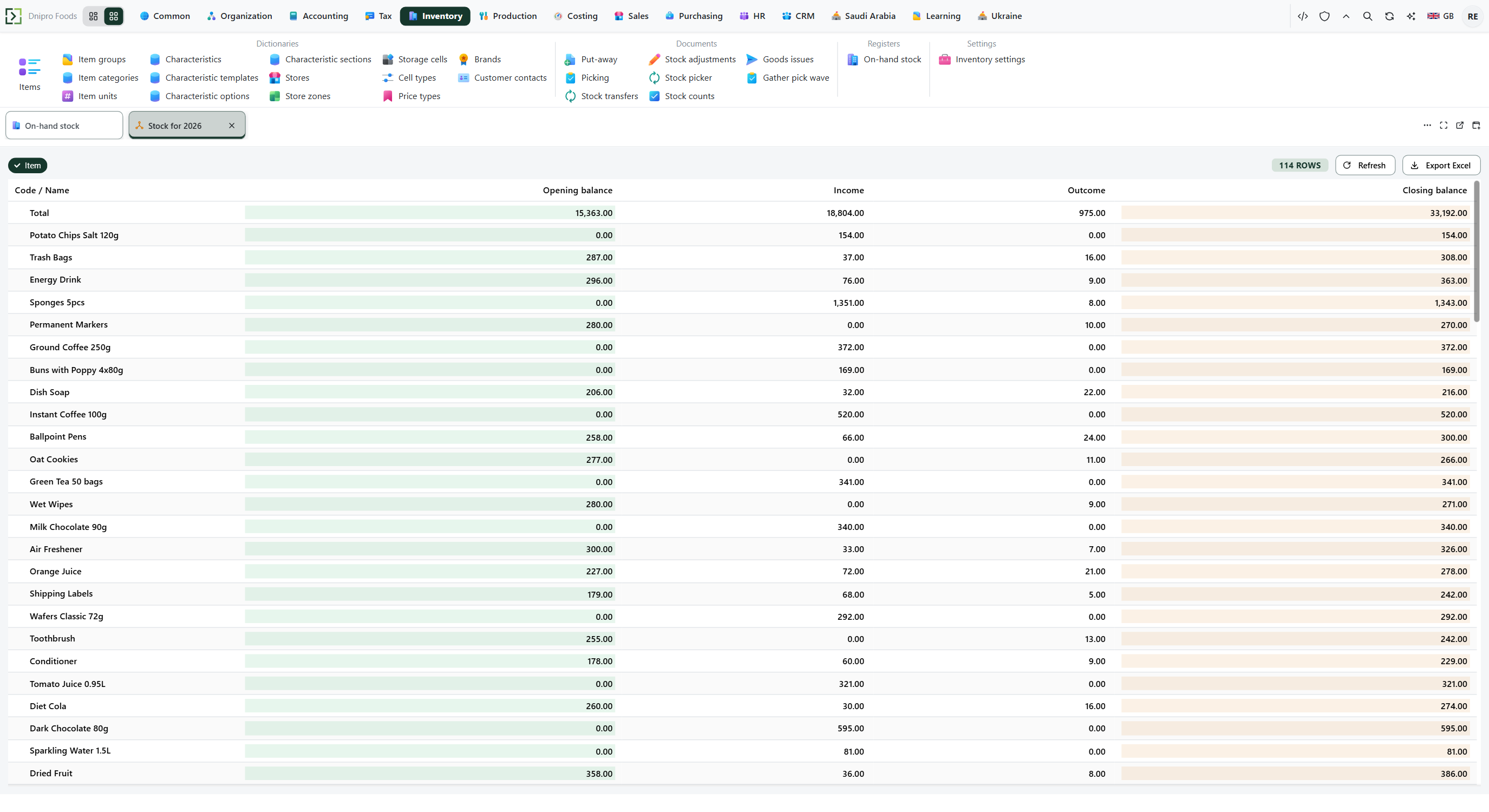 Built Stock by item and cell report: item rows show opening, incoming, outgoing and closing quantities.
Reserve is read separately: Sales → Totals → Reserved stock, layout Reserved stock by item and cell (ReservedByItemCell). The same groups, item then cell, and the same quantity. The store has 200: 100 in the picking cell and 100 in storage; an order for 40 is not picked yet — closing reserve in storage is 40. After shipment reserve is 0 and there is no row. Free by cell = balance of this cell minus this reserve.
A custom store screen#
An operational "storekeeper console" (scan an item → show balance by cell → action button) is built as a custom form — see the developer cookbook and form system.
What's not there yet#
- There is no lots, serial-number or expiry-date stock analytic.
- There is no dedicated storekeeper console. Warehouse work uses the document lists and the mobile warehouse role.
- Picking exists twice: store
PickTaskdocuments and realization Picking / Packing states are not one screen. - Changing the warehouse-task flag or shipment scheme does not replay documents that were already posted.
Same topic for other readers: User · Developer