Create an item
Updated
Create an item when you need a thing to buy, sell, or stock. Saving the card stores the item; it does not put quantity on a warehouse.
Note
Saving an item posts no stock. There is no price on this card: prices live by price type — Fill prices.
How to#
To create an item, open Ribbon → Inventory → Dictionaries → Items.
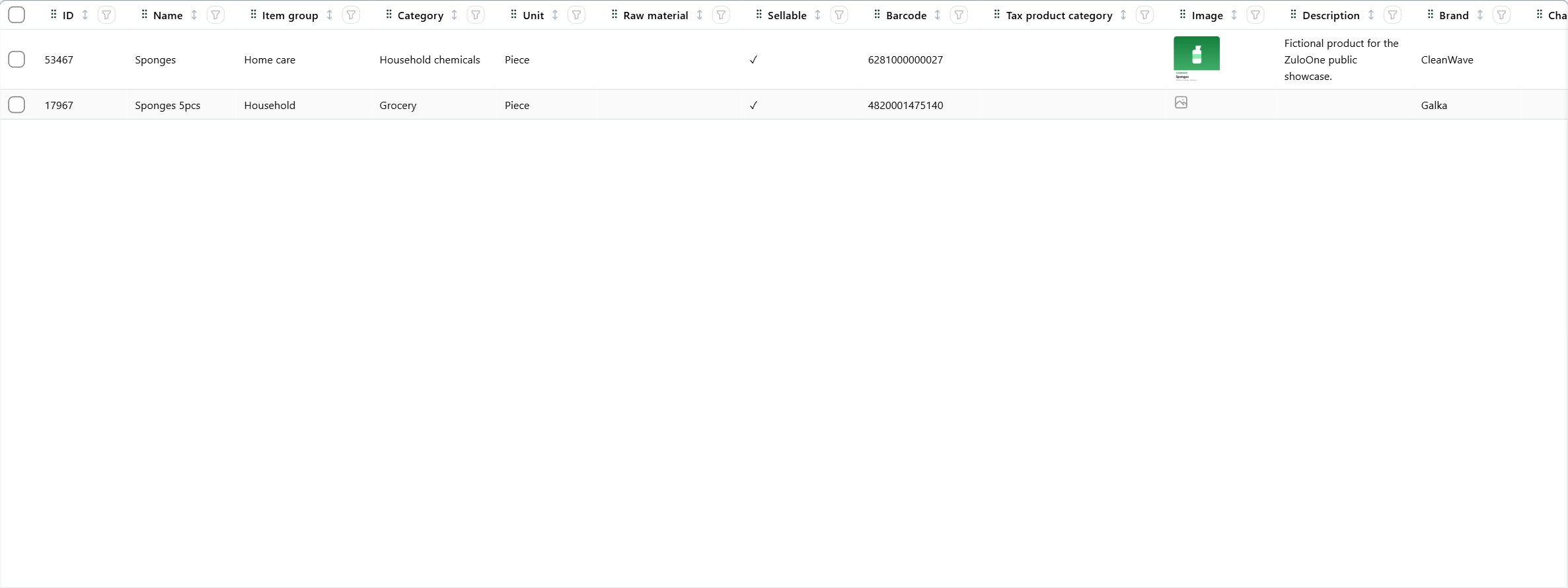 Items list: the search shows Sponges 5pcs. The product is in English.
The left pane is the item-group tree. The root folder Item groups shows every item. Select a group and the grid shows that group's items and the items in groups under it.
Press New. Fill Name, Item group, and Unit. Save. The item is in the list, and ID is issued and read-only.
Unit is the base unit on this card. It must already exist. If you pressed New with a group selected in the left tree, Item group is already that group.
Item group is the item's place in the item tree. The item uses the characteristic template of its group, or of a group above it, unless you fill Characteristic template. Fill Base name when the name should later pick up key characteristics. Turn Sellable on when the item can be sold; leaving it off still saves.
Barcode, Brand, Description, Image, Raw material, Discontinued, Net weight, kg, Gross weight, kg, Characteristic template, and VAT rate are optional. Boxes and pallets are not on this card — add them under Item units. When Base name is filled, the name can be composed from key characteristics after Save.
Example
- Name Sugar
- Item group Grocery
- Unit Piece
Save. The list shows Sugar. Stock is still zero. Sellable can stay off. A price is set later by price type, not on this card.
Tip
Create the item group first if the picker is empty. A Unit that is not already in Units of measure cannot be picked.
If the command refuses#
| What you see | What to do |
|---|---|
Fill the required fields: Name, Item group, Unit |
Fill Name, pick an Item group, and pick a Unit. |
| The Unit list is empty | Create a unit first. |
| The Item group list is empty | Create a group first. |
See also