Enter a supplier invoice
Updated
Enter the supplier's paper after the goods are already received. The receipt has already recognised the payable. This document books only the difference.
Note
Register does not book the whole bill again, and it does not change the cost of stock already received. The gap is a purchase price variance of the period. A payment is still a separate document.
How to#
To enter a supplier invoice, open Ribbon → Purchasing → Documents → Purchase orders. Open a Received order.
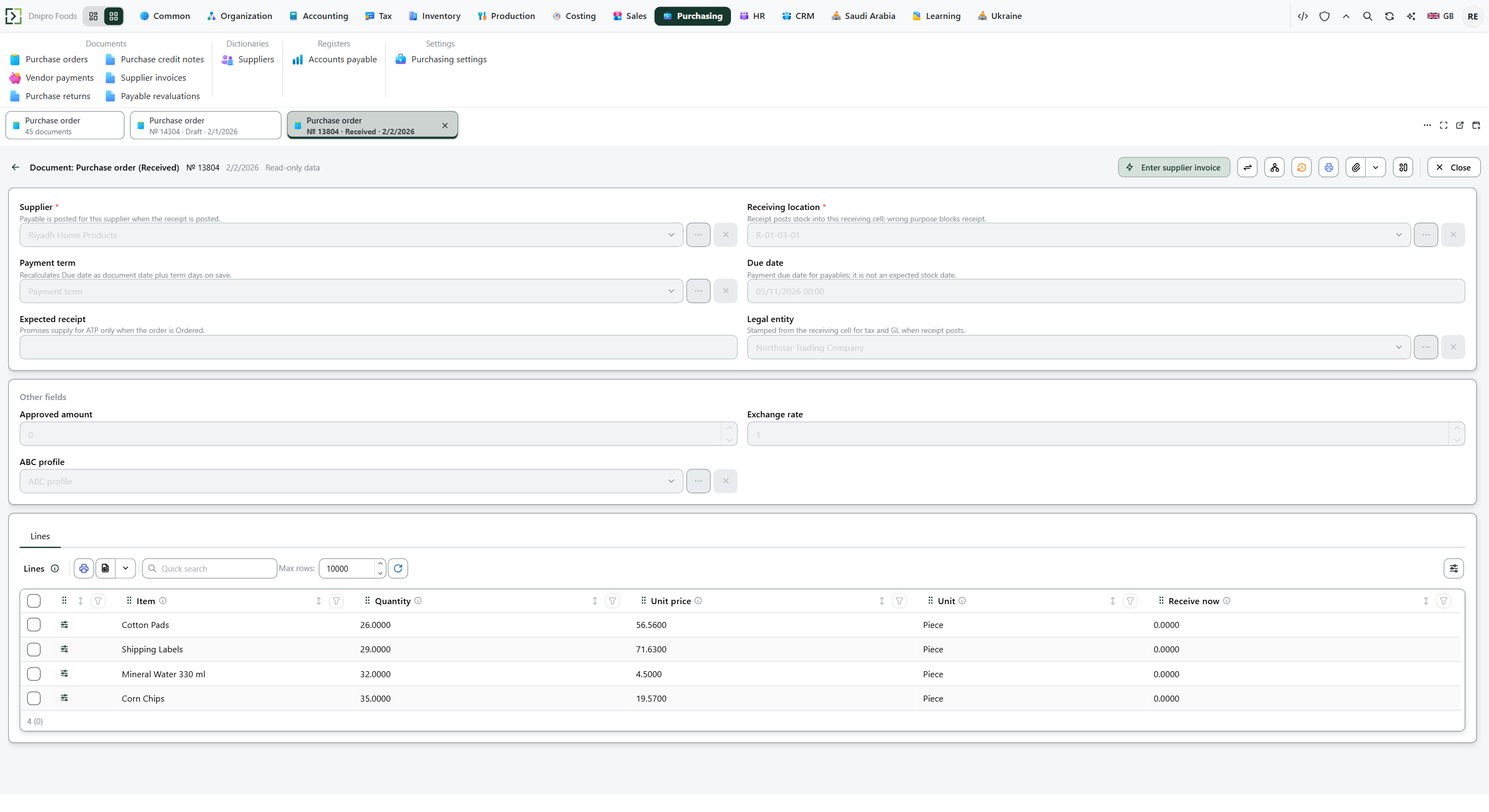 Received purchase order: Enter supplier invoice is on the card. The product is in English.
Press Enter supplier invoice. A draft opens with the supplier, the dates, and the lines that are not billed yet. The card stays Draft and receives a Number.
Type the number from the supplier's paper into Supplier's number. Fill Supplier's date when the paper has its own date. Your Number is not that number. Correct Unit price on Lines when the paper disagrees with the order. Save.
Then press Register. The header stores Accrued by receipts and Difference. The state becomes Registered. When the paper matches the receipt, Difference is 0 and nothing is posted. When the paper differs, only that difference — including tax on the difference, from Tax rate — is added to what you owe.
The state on the card does not move the invoice. Only Register does. Until you press it, the document stays Draft, however many times you save.
Example
You received 4 pieces at 25, VAT 15%. Goods 100 plus tax 15: you owe 115. Stock cost is 100.
The supplier's paper matches: 4 at 25. Difference is 0. You still owe 115. Stock cost stays 100.
The paper says 30. Billed goods 120 versus accrued 100: Difference 20, tax on that 20 × 15% = 3. You owe 115 + 23 = 138. Stock cost stays 100 — the gap is purchase price variance, not a recost.
The paper says 20. Billed goods 80 versus 100: Difference −20, tax −3. You owe 115 − 23 = 92. Stock cost stays 100.
After the receipt Paper matches Paper at 30 Paper at 20 Pieces still in 4 4 4 4 Stock cost 100 100 100 100 Difference — 0 20 −20 You owe 115 115 138 92
Tip
A service or expense with no receipt can be entered from Ribbon → Purchasing → Documents → Supplier invoices: New, fill Supplier and Lines, then Register. Nothing was accrued, so the whole invoice becomes debt.
To bill one receipt on several sheets, lower Quantity on the first invoice to what that sheet bills, Register, then press Enter supplier invoice on the order again. The new draft holds only what is not billed yet. When nothing is left, the button opens the invoice already there.
Invoice match tolerance in Purchasing → Settings → Purchasing settings is the largest difference Register accepts. Empty or zero allows a difference of any size. The difference is booked to Purchase price variance account in Accounting → Settings → Accounting settings. If that account is empty you still owe the invoiced amount; the books simply say nothing about the gap.
If the command refuses#
| What you see | What to do |
|---|---|
| The command says the supplier invoice is entered on a received order | Receive the order first. Enter supplier invoice is on Received. |
| The command says the order has no lines | Add a line on the purchase order, then receive it. |
| The command says to type the supplier's invoice number because the document number does not replace it | Fill Supplier's number. |
| The command says to specify the supplier | Pick Supplier. |
| The command says the invoice is empty | Add a line. |
| The command says the quantity must be greater than zero | Enter a Quantity above 0 on every line. |
| The command says the invoice supplier must match the receipt supplier | Use the same Supplier as the received order. |
| The contract differs from the contract of the source document. | Pick the same Supplier contract as the received order. |
| The command says there is no exchange rate of the supplier's currency to the legal entity's | Enter the rate on Supplier's date, or fill Exchange rate. |
| The command says the invoice disagrees with the receipts beyond the tolerance | Correct Unit price or Quantity, or raise Invoice match tolerance and press Register again. |
| The command names invoices and says the receipt cannot be billed twice | Lower Quantity so this invoice plus the Registered ones do not exceed what was received. |
| Enter supplier invoice opens an invoice that is already there | Nothing is left to bill on that order. |
See also
Same topic for other readers: Analyst