Pick goods
Updated
Use a pick task when goods must move from a storage cell into a picking cell. An approved sales order can open the draft; a storekeeper can also create one by hand.
Note
Confirm pick is the button that moves on-hand stock. Saving a Draft only holds the line quantity as reserved stock on the storage cell. Start picking on a sales realization leaves this task in Draft. The invoice is what ships and bills.
How to#
To pick goods, open Ribbon → Inventory → Documents → Picking.
Open a draft task.
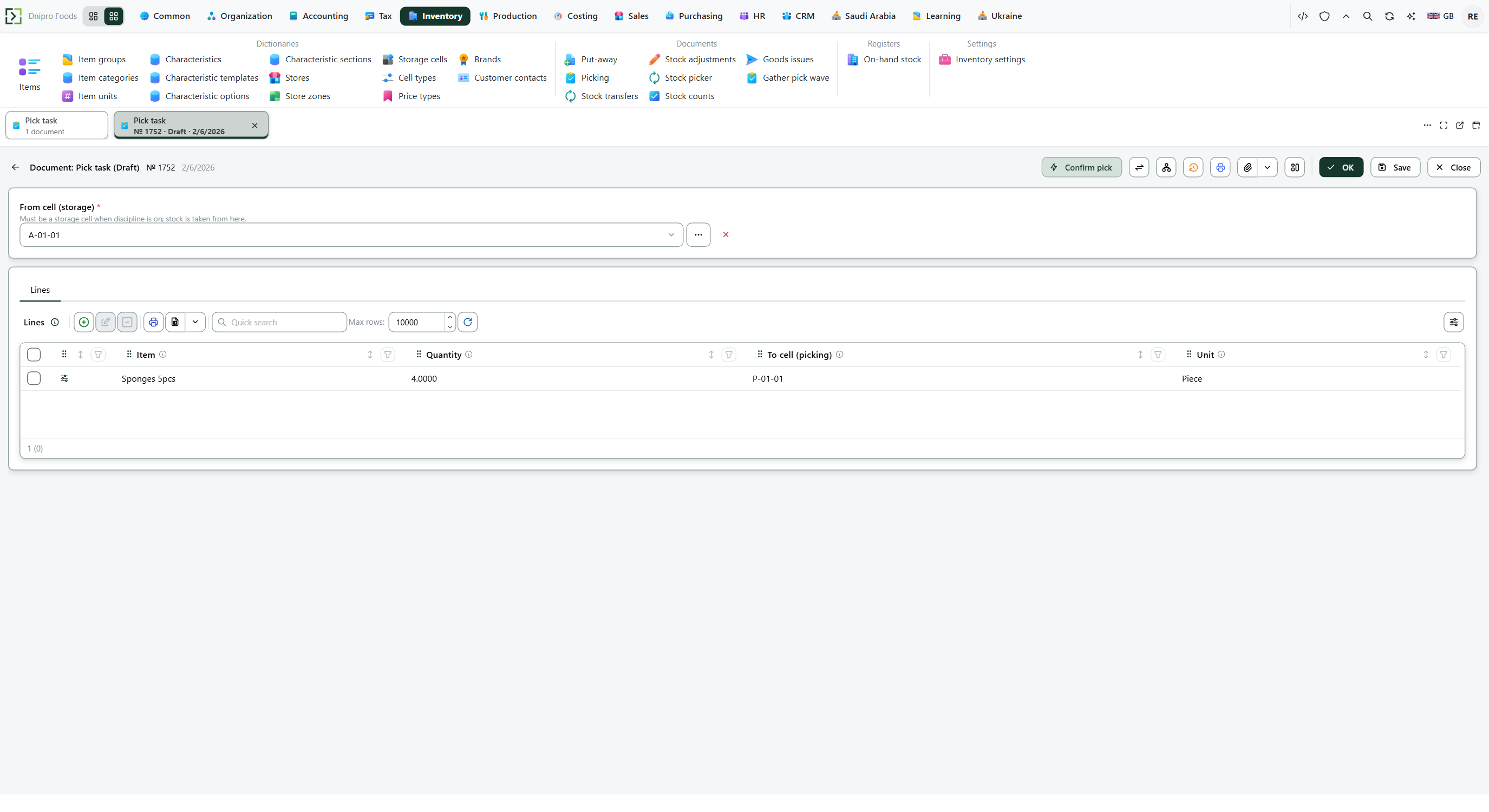 Pick task card: the storage cell is in the header and the picking cells are on the lines. The product is in English.
To create one by hand: press New. Fill From cell (storage). Add Lines with Item, Quantity, an optional Unit, and To cell (picking). Press Save. The card receives a Number and stays Draft. That save holds the quantity as reserved stock on the storage cell. On-hand stock stays in that cell.
Then press Confirm pick. The state becomes Confirmed. The storage cell decreases by the posted quantity and the picking cell increases by the same quantity. The card is read-only.
The state on the card does not move the task. Only Confirm pick does. Until you press it, the task stays Draft, however many times you save.
Start picking, Mark packed, and Mark shipped change a sales realization. This pick task stays where it is.
Gather pick wave, under Inventory → Documents, folds two or more Draft tasks that share one From cell (storage) and that belong to a sales order into one new draft, then removes the drafts it folded. A single draft, a Confirmed task, a task with no sales order, and tasks from different storage cells stay. On-hand stock stays where it is.
Cancel order on the sales order deletes the Draft pick tasks of that order. A Confirmed pick task stays.
Example
Storage cell holds 10. The task picks 4. Those 4 are reserved.
After Confirm pick:
Before After Storage cell 10 6 Picking cell 0 4 Reserved on this task 4 0
Tip
An approved sales order creates this draft only when Enforce warehouse tasks is on and Shipment scheme is Extended or Not set. Simple posts transfers instead, and the pick-task list gains nothing. Off, approval creates no pick. Both fields sit in Inventory → Settings → Inventory settings — Choose a shipment scheme.
If the command refuses#
| What you see | What to do |
|---|---|
| The command says the task is empty | Add a line. |
| The command says the quantity must be greater than zero | Enter a positive Quantity. When Qty in base unit is filled, that value is the one checked. |
| The command says the storage cell has the wrong purpose | Enforce warehouse tasks is on. Choose a cell whose Purpose is storage. |
| The command says the picking cell has the wrong purpose | Enforce warehouse tasks is on. Choose a cell whose Purpose is picking. |
| The command says the storage cell is short | Put stock into From cell (storage), or lower the quantity. Another document's reservation on that cell counts. This task's own draft reservation does not. |
| The card cannot be edited | The task is Confirmed. There is no command that returns it to Draft. |
See also