Adjust stock
Updated
Use a stock adjustment for an opening balance, a surplus, or a shortage when you already know the signed quantity. Post adjustment posts it: a plus adds stock, a minus writes it off.
Note
A positive Quantity adds stock and a negative Quantity writes it off. Neither changes customer or supplier debt. A physical count is a stock count.
How to#
To adjust stock, open Ribbon → Inventory → Documents → Stock adjustments.
Press New. The card opens in Draft. Fill Cell and Reason. On Lines, enter Item and Quantity. A positive Quantity adds stock. A negative Quantity writes stock off. Fill Unit when the quantity is not already in the item's base unit. Leave the line Cell empty to use the header Cell. Fill the line Cell when that line moves another cell. On a positive line, Unit price is the cost of the surplus.
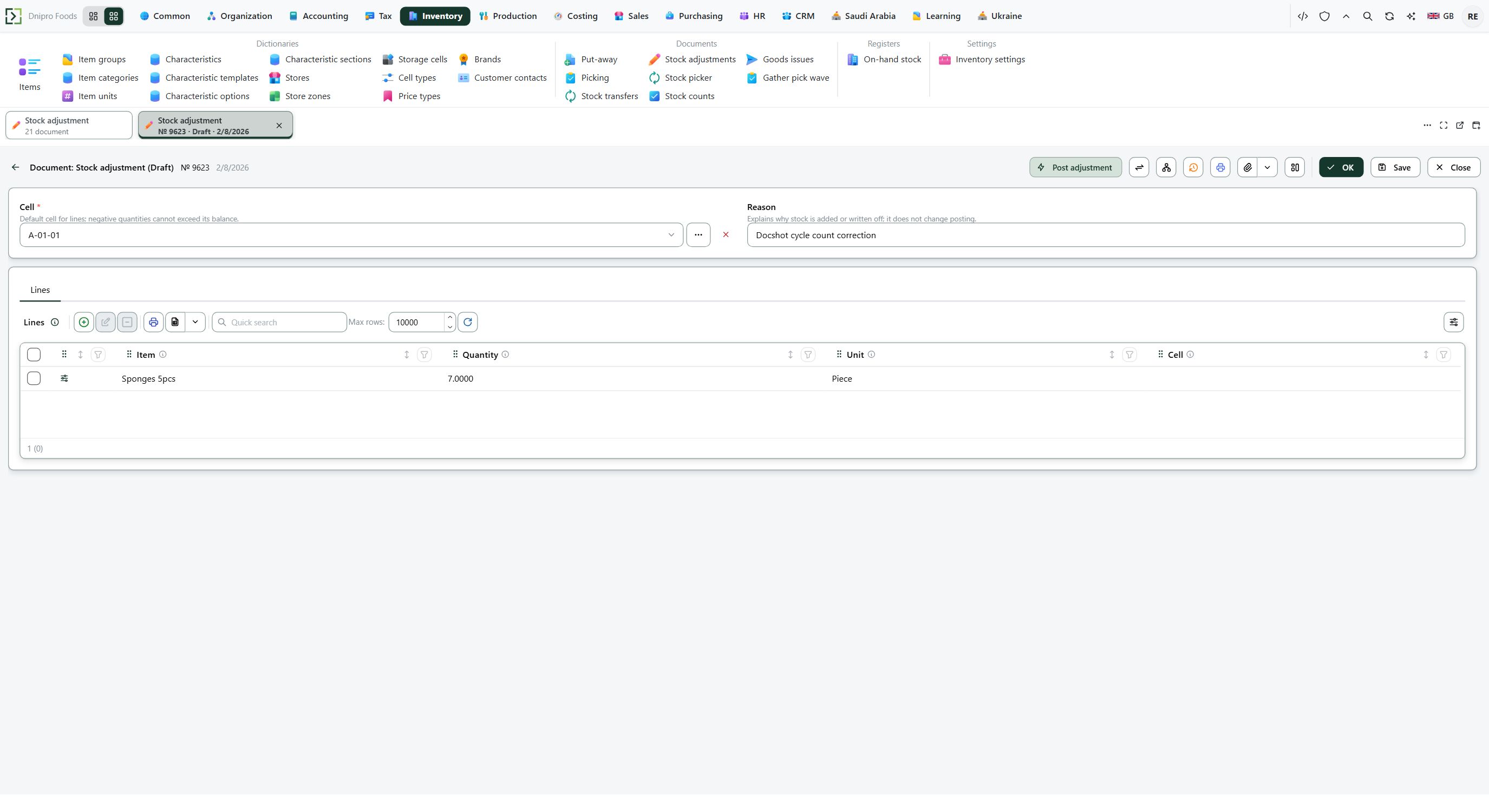 Stock adjustment card: the header cell, the reason, and the signed lines are visible before posting. The product is in English.
Press Save. The card receives a Number and stays Draft. Stock stays as it was.
Then press Post adjustment. The state becomes Posted. Stock changes by the signed quantity in the item's base unit.
The state on the card does not post the document. It changes when you press Post adjustment. Until you press it, the document stays Draft, however many times you save.
Example
The header cell holds 10. Another cell holds 4. One line adds 6 on the header (line Cell empty): 10 + 6 = 16. One line writes off 3 from the other cell: 4 − 3 = 1.
After Post adjustment:
Before After Header cell 10 16 Other cell 4 1
Tip
An adjustment does not read Enforce warehouse tasks or Shipment scheme. No put-away task and no pick task are created. Reason is optional text. It is stored and printed; it does not change the quantity.
If the command refuses#
| What you see | What to do |
|---|---|
| The command refuses an empty document | Add a line on Lines. |
| The command says the write-off is above the balance of the header cell | The command adds every negative line of that item and compares the sum with the header Cell. Lower Quantity, or choose a header Cell that holds the goods. A write-off of 3 when the header cell has 2 stays Draft. |
| Posting refuses a line cell that is short | The quantity is checked against the line Cell when that cell is filled, and against the header Cell when the line cell is empty. A write-off of 3 from a cell that has 2 stays Draft. The header cell can hold 10 and the document still stays Draft. |
| Posting says free stock is short | Quantity reserved for other documents is unavailable. On-hand 10 with 8 reserved: a write-off of 4 stays Draft. A write-off of 2 becomes Posted and leaves 8 on hand. |
| Stock moved on the header cell | The line Cell was empty, so the line used the header Cell. Fill the line Cell before posting when the line must move another cell. |
| You expected customer or supplier debt to change | Use a sales or purchasing document. This document changes stock. |
See also