Put goods away
Updated
Use a put-away task when quantity already on hand must move from a receiving cell into storage. Confirm put-away is the button that posts the move.
Note
A saved Draft does not move stock. Confirm put-away subtracts the quantity from From cell (receiving) and adds it to each line's To cell (storage). This document writes no supplier payable, no expected receipt, no item cost, and no ledger.
How to#
To put goods away, open Ribbon → Inventory → Documents → Put-away.
Open a draft. The card shows From cell (receiving) and the lines.
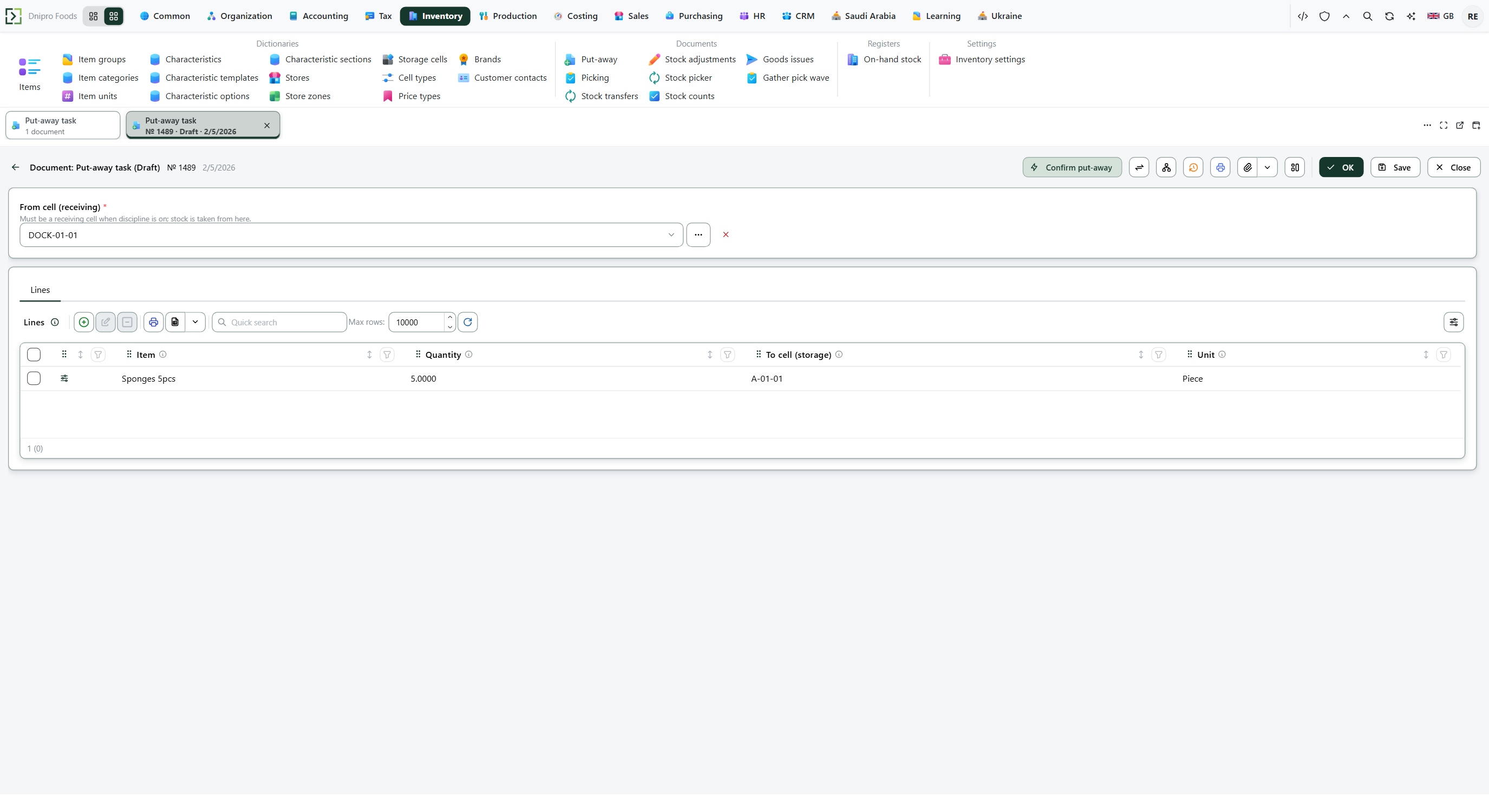 Draft put-away № 1489, dated 2/5/2026: From cell (receiving) is DOCK-01-01, and the line is 5 of Sponges 5pcs in unit Piece into A-01-01. Confirm put-away is on the card and has not been pressed. The product is in English.
To create one: press New, fill From cell (receiving), add Lines with Item, Quantity, Unit when the quantity is not already in the item's base unit, and To cell (storage), then Save. The card receives a Number and stays Draft. Then press Confirm put-away. The state becomes Confirmed. The source cell decreases and each target cell increases.
A received purchase order, when Enforce warehouse tasks is on, has already opened this draft. Open that card and press Confirm put-away.
The state on the card does not move the task. Only Confirm put-away does. Until you press it, the task stays Draft, however many times you save. Confirmed is read-only, and the command is no longer on the card.
Example
- Number 1489
- Item Sponges 5pcs
- From cell (receiving) DOCK-01-01
- To cell (storage) A-01-01
Receiving cell holds 5. The task puts 5 away into storage.
After Confirm put-away:
Before After Receiving cell 5 0 Storage cell 0 5
Tip
A received purchase order opens this draft only when Enforce warehouse tasks is on. Off, the receipt opens no task, and Confirm put-away still accepts any cells as long as the source has free stock. On, From cell (receiving) must have purpose Receiving, and every To cell (storage) must have purpose Storage. The flag sits in Inventory → Settings → Inventory settings — Choose a shipment scheme.
If the command refuses#
| What you see | What to do |
|---|---|
| The command says the put-away is empty and asks for lines | Add a line. |
| The command says the line quantity must be greater than zero | Enter a positive Quantity on every line. |
| The command says the source cell has a purpose other than receiving | Enforce warehouse tasks is on. Choose a receiving cell for From cell (receiving). |
| The command says the target cell has a purpose other than storage | Enforce warehouse tasks is on. Choose a storage cell for To cell (storage). |
| The command says the receiving cell is short, and shows the required quantity and the quantity on hand | Put stock into that cell, or lower Quantity. A refused confirm leaves both cells unchanged. |
| Posting says free stock is short, and names the item and the cell with the required quantity and the free quantity | Another document has reserved part of that cell. On-hand can still cover the line. Lower Quantity, or release that reservation. |
| The card cannot be edited | The task is Confirmed. There is no command that returns it to Draft. |
See also