Create a bill of materials
Updated
Create a bill of materials when you know the recipe for a product: how many pieces one run yields, and which components that run consumes.
Note
Saving the bill posts no stock. A production order copies the lines when you press Expand bill of materials.
How to#
To create a bill of materials, open Ribbon → Production → Dictionaries → Bills of materials.
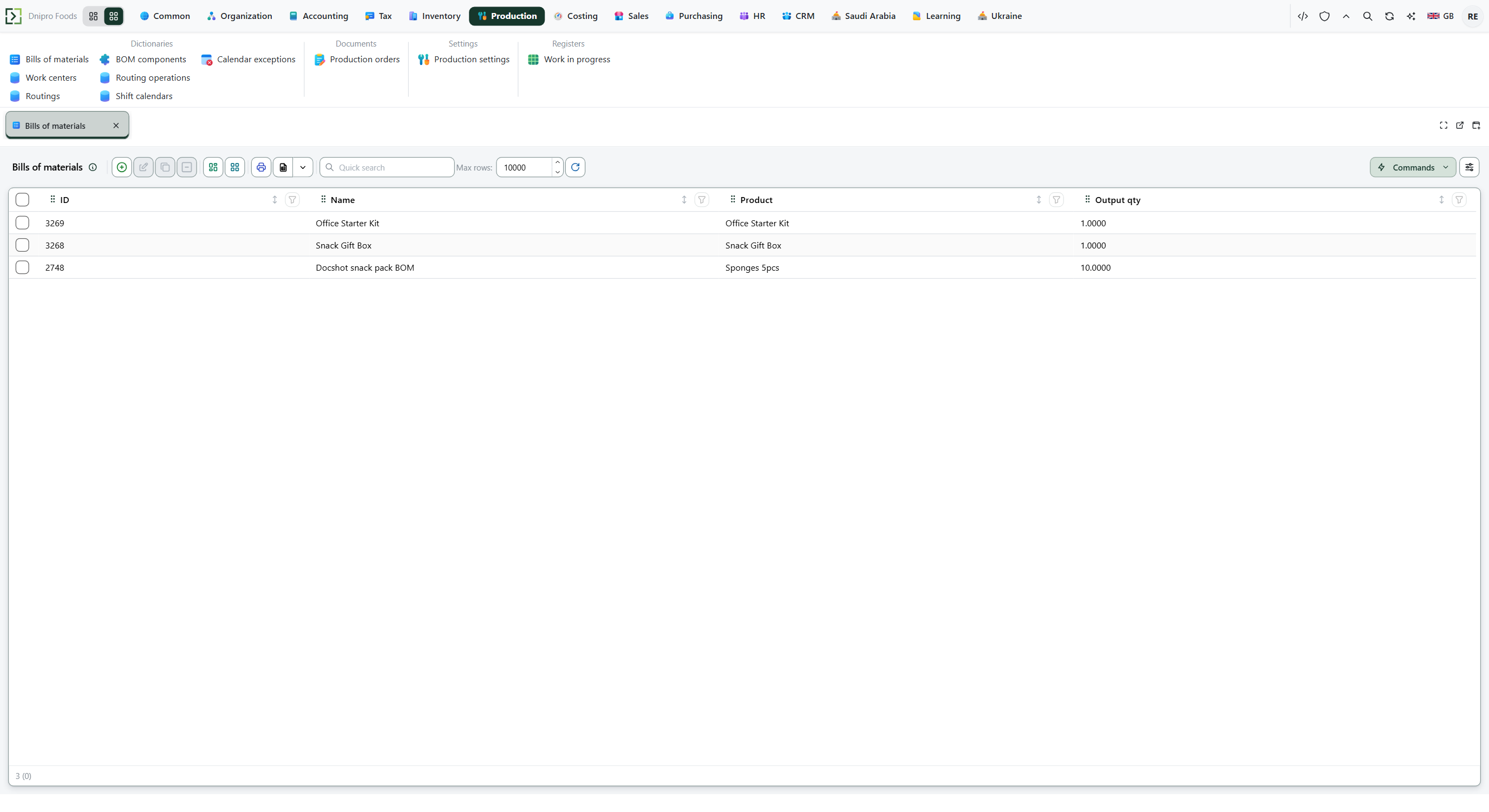 Bills of materials: Office Starter Kit and Snack Gift Box show an output qty of 1, and Dochot snack pack BOM for Sponges 5pcs shows an output qty of 10. The product is in English.
Press New. Fill Name, Product, and Output qty. Save. The card receives an ID and the row appears in Bills of materials. Stock stays as it is.
Then fill Components. Each line needs Component and Qty per unit. Empty Qty unit means Qty per unit is already in the component's stock unit. Tick Explode when that component has its own bill and the order should take the raw materials, not the assembly. Save. The lines stay on this card. Stock is still unchanged.
The same lines also open from Ribbon → Production → Dictionaries → BOM components. There each row names Bill of materials, Component, Qty per unit, Qty unit, and Explode.
Output qty of 0 or below scales Qty per unit by the order quantity. Explode walks the component's own bill.
On a later production order, press Expand bill of materials. The order's component lines are replaced from this bill. The order stays Draft. Stock stays as it was.
Example
- Name Office Starter Kit
- Product Office Starter Kit
- Output qty 1
On Components (Qty unit Piece, Explode off):
- Component A4 Paper
- Qty per unit 1
- Component Notebook
- Qty per unit 2
- Component Ballpoint Pens
- Qty per unit 1
- Component Sticky Notes
- Qty per unit 2
Save. The list shows the bill. Stock is still zero. An order of 1 that expands this bill needs those four quantities.
Tip
Explode on a component walks that component's own bill: two bread, dough exploded, dough's bill 10 flour per 1, need 20 flour. The same line with Explode off needs 2 dough. Two bills for one Product are ambiguous: expansion uses the first bill returned. If Trade profile is BuySell, production is refused — Produce an item from a bill of materials.
If the command refuses#
| What you see | What to do |
|---|---|
| Fill the required fields: Name, Product, Output qty | Fill Name, pick a Product, and enter Output qty. |
| Fill the required fields: Bill of materials, Component, Qty per unit | On BOM components, pick the bill, pick a Component, and enter Qty per unit. |
| Save the record to edit related lists | Save the bill header first, then add Components. |
| The Product list is empty | Create the item first — Create an item. |
| The expand command says there is no unit conversion for a component | Empty Qty unit, or pick a Qty unit that converts to the component's stock unit. Then press Expand bill of materials again. |
| The expand command says the bill loops through exploded components | Turn Explode off on the line that points back at this product, or remove the loop from the nested bill. |
| The expand command says no bill was found for the product | Create a bill for that Product, then press Expand bill of materials on the order again. |
| You expected stock to move after Save | Stock moves on the production order, not on this card. |
See also