Export DPS payroll forms
Updated
From a tax return, export the monthly State Tax Service (ДПС) payroll calculation and its annexes as a file you can copy or import into M.E.Doc.
Note
Export DPS payroll forms (J0500111) does not file the cabinet and does not sign. The file is unsigned
DECLARfor M.E.Doc import, plus CSV in Payload. It is not a signed cabinet container. The return stays Draft or Filed. Paying withholdings is a later document.
How to#
To export, open Ribbon → Tax → Documents → Tax returns. Open the return for the month. If you have no return yet, open Ribbon → Tax → Dictionaries → Tax periods, open the period, and press Build return.
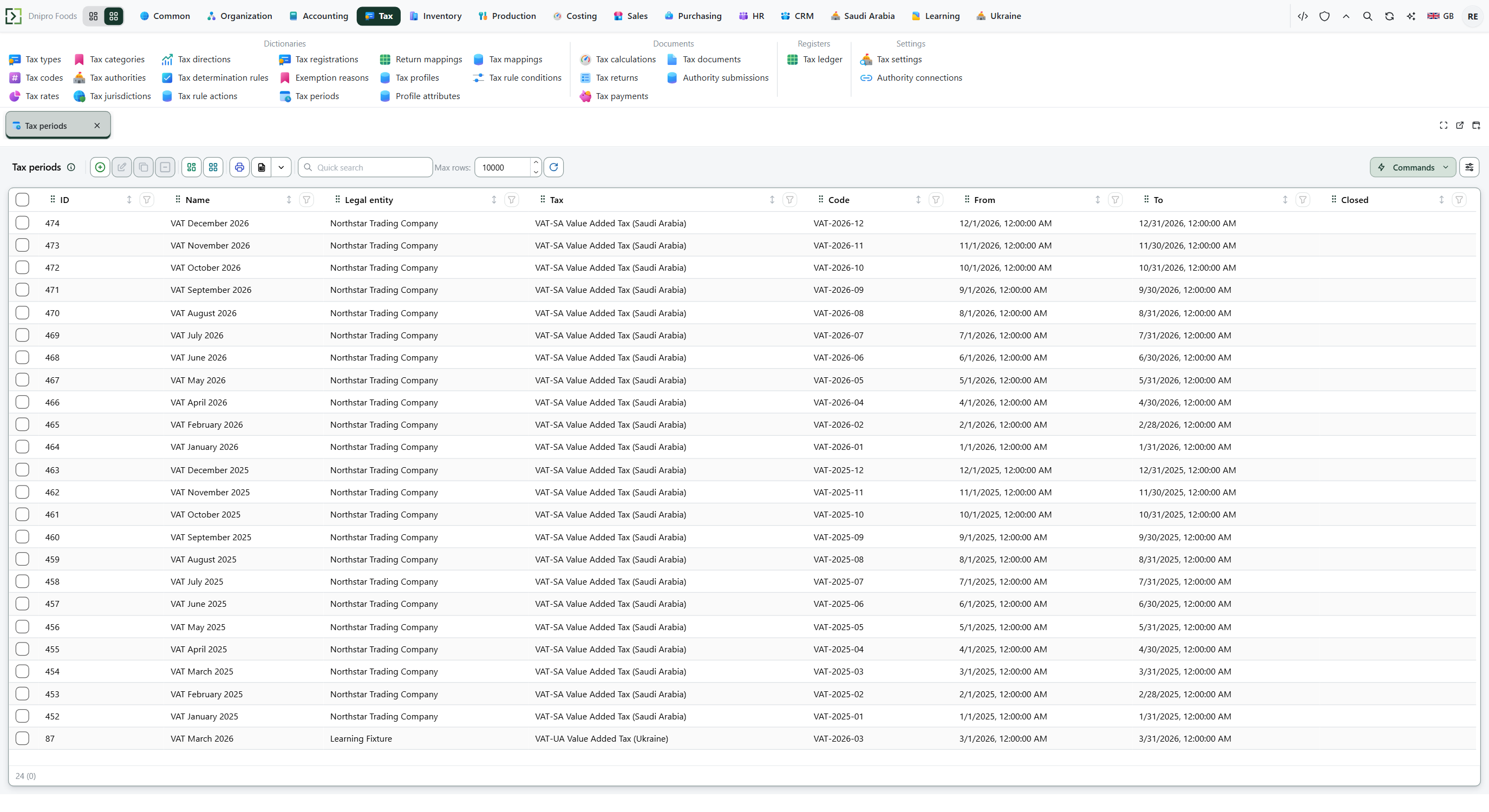 Tax period list: choose the month, then press Build return. The product is in English.
On the return, press Export DPS payroll forms (J0500111). The command writes one row per form. The return state does not change.
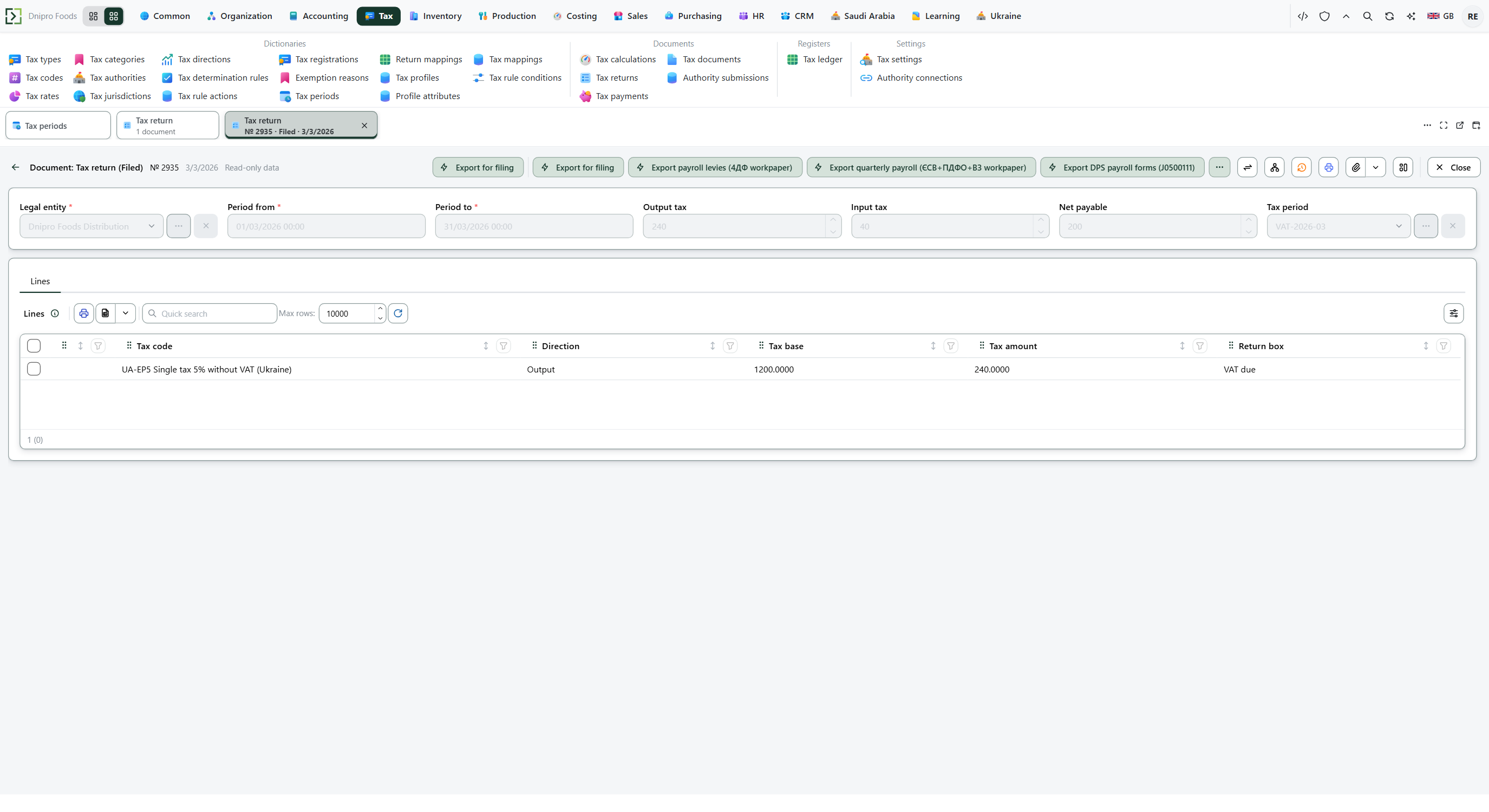 Tax return card: the payroll export buttons sit on this card. The product is in English.
Open Ribbon → Ukraine → Dictionaries → Tax filing export. Open the rows for this legal entity and period.
| Return type | What it is |
|---|---|
J0500111 |
Monthly tax calculation |
J0510411 |
Annex 4DF |
J0510111 |
Annex D1 |
J0510511 |
Annex D5, only when the month has hire, termination, or transfer events |
J0510611 |
Annex D6, only when Special tenure code (D6) is filled |
Read Payload for the CSV. Read DECLAR XML (M.E.Doc import) for the unsigned XML. Exporting the same period again replaces that row. It does not touch the VAT export.
The print Payroll calculation (J0500111) is on the same return card.
The same card also writes workpapers that are not official DPS blanks. Export payroll levies (4ДФ workpaper) and print Payroll levies (4ДФ workpaper) take withholdings for the header period: employee, tax code, base, withheld. The finished text is Tax filing export, type UA-LEVY. Repeating the export for the same period replaces that row and does not touch the VAT export. Export quarterly payroll (ЄСВ+ПДФО+ВЗ workpaper) and print Quarterly payroll (ЄСВ+ПДФО+ВЗ workpaper) take social-insurance contributions and withholdings for the header period. Type UA-QPR. Repeating it replaces that row and does not touch VAT or UA-LEVY.
Inspection codes come from the legal entity: DPS region code (C_REG) and DPS office code (C_STI), two characters each. Employee tax id is Tax card number (РНОКПП) on Ribbon → HR → Dictionaries → Employees. Empty Income sign (4DF) means 101.
To fill paid and transferred columns, accrue payroll, press Pay payroll on the payroll payment, then open Ribbon → Ukraine → Documents → Tax remittance to budget, fill the personal income tax (ПДФО) and military levy (військовий збір) lines, and press Remit to budget. Export the forms again.
Example
You accrue ₴10,000 in March: personal income tax 1,800, military levy 500, net pay 10,000 − 1,800 − 500 = 7,700, employer social insurance (ЄСВ) 2,200.
Accrued After Pay payroll and remittance Salary 10,000 10,000 paid Personal income tax 1,800 1,800 transferred Military levy 500 500 transferred Net pay 7,700 7,700 paid Employer social insurance 2,200 2,200 (row 7 stays) Before payment, annex 4DF shows accrued salary 10,000, PIT 1,800, military 500, and paid zeros. After Pay payroll and two remittances, the same amounts appear in both accrued and paid columns, income sign
101.
4DF Accrued Paid / transferred Income 10,000 10,000 Personal income tax 1,800 1,800 Military levy 500 500 Calculation row 1.1 is salary ₴10,000. Row 7 stays ₴2,200 after you pay the fund. The Payroll levies (4ДФ workpaper) has two rows, 1,800 + 500 = ₴2,300.
An April accrual of ₴20,000 does not enter the March table. The quarterly workpaper for March shows 1,800 + 500 + 2,200 = ₴4,500 to transfer.
A salary of ₴150,000 hits the contributory ceiling of ₴120,000: social insurance is on 120,000; personal income tax and military levy are on all 150,000.
Tip
Social insurance rates live on Ribbon → HR → Settings → HR settings: Social insurance rate, employee 0, Social insurance rate, employer 0.22, Social insurance rate, employer (foreign staff) 0.22, Contributory wage ceiling 15 minimum wages (at ₴8,000 that is ₴120,000). Zero in the ceiling means there is no cap. Withholdings live on Ribbon → Ukraine → Settings → Ukraine settings: Personal income tax (payroll)
UA-PDFO, Military levy (payroll)UA-VZ. Leave those empty, and nothing is withheld. Amounts per employee are in Ribbon → Ukraine → Registers → Payroll levies withheld. Other buttons on the same card write VAT and single-tax files — Export Ukrainian tax forms. Annexes D2 and D3 are not filed by an ordinary employer.
If the command refuses#
| What you see | What to do |
|---|---|
| The command says the return was not found | Open a saved tax return and press Export DPS payroll forms (J0500111) on that card. |
| Export DPS payroll forms (J0500111) is not on the card | You are still on the tax period. Press Build return, then export from the return. |
| Paid and transferred columns are zero | Accrue payroll, press Pay payroll, then Remit to budget for UA-PDFO and UA-VZ. Export again. |
| D5 or D6 XML is empty | That month has no hire, termination, transfer, or special-tenure rows. The annex is not filed. |
| A second export for the same month | That is expected. The new row replaces the previous J0500111 family for this legal entity and period. |
See also
Same topic for other readers: Developer